Comparison table
| Product | Price | Type | System coverage | Bidirectional / resets | Display |
|---|---|---|---|---|---|
| FOXWELL NT301 | Check price on Amazon | Handheld | Engine/OBD2 only — no ABS, SRS, EPB, A/C, battery | No bidirectional, no special functions | Not stated |
| Autel MaxiCOM MK808Z | Check price on Amazon | Tablet | All systems, 180+ brands, CAN FD & DoIP, FCA SGW bypass | Yes — active tests + 28 resets | Android 11 tablet, 4GB/64GB |
| OWMSIC OBD2 + Battery Tester | Check price on Amazon | Handheld | OBD2 (all 10 protocols) + 12V battery & charging system | Not stated | Color screen, size not stated |
| OnRetul V520 | Check price on Amazon | Handheld | OBD2 only; excludes hybrids/EVs | Code clear, MIL reset, O2 & component tests | 2.8-inch color, dark/light modes |
| ANCEL DS200 | Check price on Amazon | Handheld touchscreen | Full system — ABS, SRS, transmission, TPMS, BCM | 15 resets; bidirectional not stated | 5-inch touchscreen |
| MOCATEC WiFi ELM327 | Check price on Amazon | WiFi dongle + phone | OBD2 only (12V vehicles, 1996+) | Code clear; no FORScan support | Uses your phone/tablet |
Quick answer: If you want one tool that covers most home-garage jobs without a huge outlay, the FOXWELL NT301 OBD2 Scanner Live Data Professional Mechanic OBDII Diagnostic Code Reader Tool for Check Engine Light is the sensible default at $55.99. If you actually need to command modules — run an ABS pump, code an injector, reset an EPB — you have to step up to the Autel Obd2 Scanner Diagnostic Tool MaxiCOM MK808Z. And if you just want the cheapest way to see a code on your phone, a $15.95 WiFi dongle does that fine.
The gap between a $16 dongle and a $479 tablet is not "quality." It's access. Cheap tools read the generic OBD2 pipe that every 1996+ car exposes for emissions testing. Expensive tools talk to the other twenty-odd modules — ABS, SRS, transmission, body control — that the generic pipe never touches. Pick based on which jobs you plan to do, not on which tool looks the most professional on the bench.
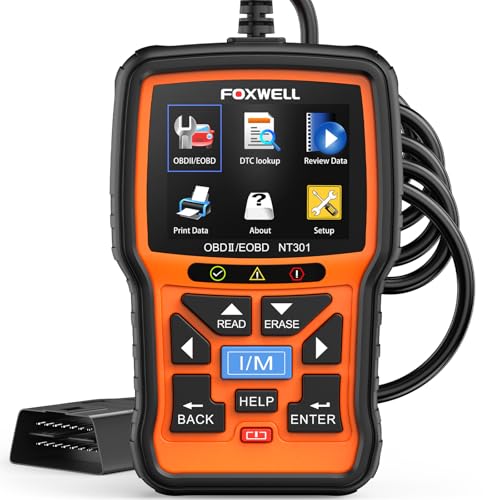
FOXWELL NT301 OBD2 Scanner — Best Overall
The FOXWELL NT301 OBD2 Scanner Live Data Professional Mechanic OBDII Diagnostic Code Reader Tool for Check Engine Light hits the price-to-capability sweet spot for someone who mostly chases check engine lights.
Finding the right best obd2 scanners diy mechanics comes down to matching the features to how you will actually use it.
It reads and clears DTCs, turns off the CEL/MIL, resets monitors, pulls emissions readiness status, retrieves the VIN, and — the part that matters — logs live sensor data in graph form. Watching oxygen sensor voltage, fuel trims, coolant temp, and RPM as a trace rather than a number is how you catch a lazy O2 sensor or an intermittent fault that never sets a hard code. It also runs the two advanced OBDII modes worth having: an O2 sensor test and an EVAP system leak monitor, which is the honest first step on a P0442-type gas cap/EVAP complaint.
Protocol coverage is the full standard set — KWP2000, J1850 VPW, ISO9141, J1850 PWM, and CAN — spanning most 1996+ US gasoline cars, light trucks and SUVs, plus many 2000+ European and Asian models and 12V diesels with an OBD2 port.
Be clear on the ceiling. FOXWELL states plainly that this is a basic code reader: no ABS, SRS, EPB, A/C, or battery system scanning, and no bidirectional control, calibration, or reset functions. If your job list includes "bleed the ABS module," this is the wrong tool. If it's "why is my engine light on," it's the right one.
Autel MaxiCOM MK808Z — Best for serious DIY and small shops
At $479.00 the Autel Obd2 Scanner Diagnostic Tool MaxiCOM MK808Z: 2026 Bidirectional Scan Tool, 28+ Service, Active Tests Scanner for Car, All System OBD2 Diagnostics Car Scanner for DIY, Mechanic and Small Shops is a different category of purchase, and it earns it in one word: bidirectional.
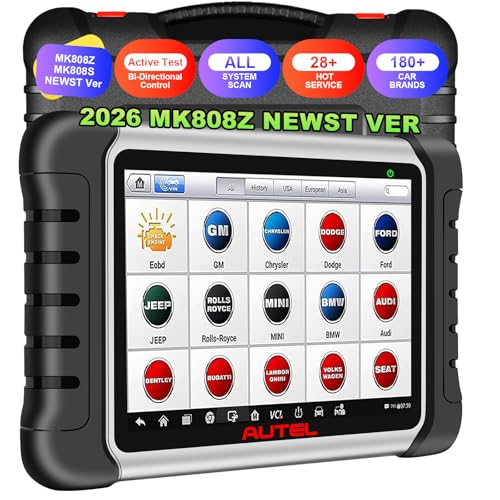
Bidirectional control means the tool sends commands to the car instead of only listening. You can actuate ABS pumps, windows, door locks, solenoids and lights on demand — verifying whether an actuator physically works without pulling it out of the car. That single capability converts a lot of "replace the part and hope" into "test the part and know."
It scans all systems, reads and clears codes across modules, and displays live data in text, graph, and analog formats. The service side lists 28+ resets including Oil, EPB, SAS, SRS, injector coding, BMS, DPF regeneration, crankshaft position sensor relearn, and throttle body adaptation — the calibrations that otherwise force a shop visit after you've already done the mechanical work yourself.
Coverage claims 180+ brands with CAN FD and DoIP support for newer vehicles. The genuinely useful detail for a lot of American driveways: built-in FCA Auto Authorization to get past the security gateway on 2018+ Chrysler, Jeep, Dodge and Ram vehicles. Without SGW access, many scan tools are read-only on those cars. Hardware is Android 11, 4GB RAM, 64GB storage, dual-band Wi-Fi.
Buy this if you work on other people's cars, own a modern FCA vehicle, or genuinely do post-repair calibrations. Otherwise it's a lot of money for features that sit idle.
ANCEL DS200 Full System OBD2 Scanner — Best full-system tool under $300
The ANCEL DS200 Full System OBD2 Scanner for DIY Car Owners, Lifetime Updates sits in the useful middle at $269.99: full-system access without tablet money.
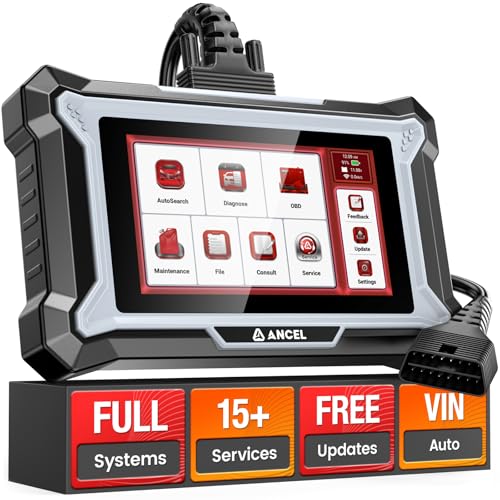
It reaches beyond engine codes into ABS, SRS, transmission, TPMS, BCM and more — which is the real dividing line in this category. An airbag light or an ABS light will never appear on a generic code reader, no matter how good its live data graphing is. The DS200 also carries 15 reset functions covering Oil, EPB, SAS, BMS, DPF and TPMS.
Two things separate it from cheaper full-system tools. First, lifetime free updates with no annual subscription — worth checking carefully against competitors, because subscription renewals can quietly exceed the original purchase price over a few years. Second, a 5-inch touchscreen with a shortcut menu that puts common services one tap away rather than four menus deep. There's also built-in online technical support during diagnostics.
ANCEL is upfront about something every scanner buyer should internalize: codes should be cleared after the underlying fault is repaired, because active faults simply come back. The DS200 does not list bidirectional active tests, so if commanding actuators is your requirement, it isn't this tool.
OWMSIC OBD2 Scanner with Battery Tester — Best 2-in-1 for no-start diagnosis
The OWMSIC OBD2 Scanner with Battery Tester, 2-in-1 Design 1-Sec Read/Clear Check Engine Code Reader, 12V Car Battery Health & Charging System Analyzer, Universal Auto Diagnostic Tool for 1996+ Cars solves a problem the others ignore: a lot of "the car won't start" and "weird electrical gremlin" complaints are battery problems, not engine problems.
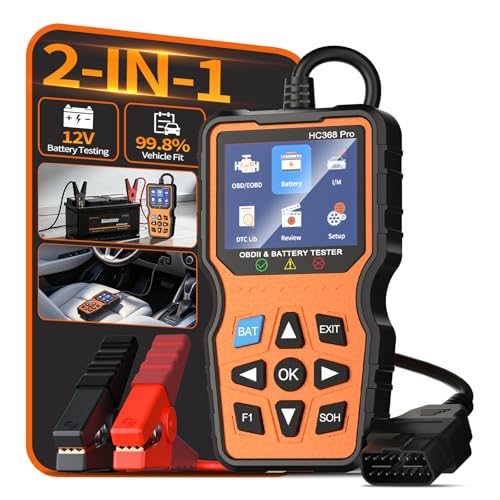
For $35.98 you get standard OBD2 code reading plus a 12V battery health test that reports state of charge, state of health, internal resistance, and CCA. Internal resistance and CCA are the numbers that expose a battery that still shows 12.4 volts but collapses under crank load — the failure mode a cheap multimeter misses entirely. It analyzes the charging system too, which is how you separate a dying battery from a dying alternator.
On the scanner side it covers all 10 OBD2 protocols on most 1996+ OBDII-compliant vehicles, includes a one-click I/M readiness hotkey for pre-smog checks, and shows live data and freeze frame on a color screen. The built-in DTC library with thousands of definitions means codes appear in plain English without a phone or internet connection.
Good pick before winter or a long road trip, and a genuinely sensible tool for someone whose diagnostic questions are as often "is this battery done?" as "what's this light?"
OnRetul V520 OBD2 Diagnostic Scanner — Best budget standalone reader
At $32.90 the V520 OBD2 Diagnostic Scanner Tool - Quickly Engine Check Light Code Reader, Voltage Tester, I/M Readiness, Reset, and Code Eraser, Suitable for All OBD II Protocol Car & Truck Since 1996 packs a surprising amount of the standard feature list into the cheapest self-contained unit here.
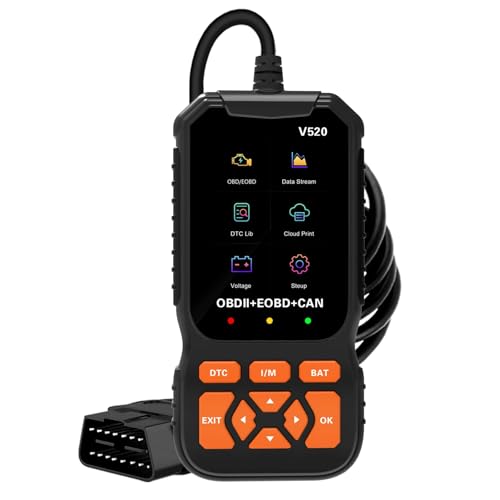
It covers full OBDII modes: read and clear codes, turn off the MIL, freeze frame data, I/M readiness, VIN retrieval, battery voltage test, live data with graphing, O2 sensor tests, onboard monitoring mode, and component testing. The headline spec is a 35,901-code DTC lookup library — meaningfully larger than the 3,000–10,000 that older readers ship with, which matters when you pull a manufacturer-specific code and want a definition on the screen rather than a search bar.
The 2.8-inch color screen has dark and light modes with adjustable brightness, the beep can be turned off, and a status LED gives immediate feedback: green for a good connection, yellow for incompatibility or connection failure, red when faults are present. That yellow light is more useful than it sounds — it tells you whether the problem is the car or the connection.
Compatibility is stated as most 1996+ (USA) / 2002+ (EU) / 2008+ (Asia) vehicles with a 16-pin OBD2 port. Note the explicit exclusions: not compatible with new energy vehicles, hybrids, or anything not following the OBD2 protocol. If you drive a hybrid, look elsewhere on this list.
MOCATEC WiFi ELM327 OBD2 Adapter — Best cheapest phone-based option
The WiFi ELM327 OBD2 Adapter WiFi ELM 327 OBD2 Scanner for Android iOS iPhone OBDii Car Scanner Code Reader Connector Dongle OBD ELM327 OBD2 Scanner Diagnostic Tool Interface for Torque costs $15.95 and turns a phone you already own into a scan tool.
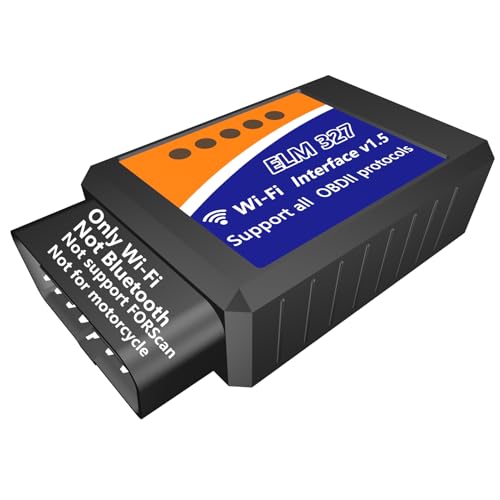
It scans, explains and clears fault codes, clears the check engine lamp, and reads freeze frame, live data, vehicle info and I/M readiness. It also handles smog, EVAP and O2 tests, and streams far more sensor data than your dashboard shows — handy for spotting a problem developing while driving rather than after it strands you. It works with all 12V vehicles from 1996 onward.
Read the compatibility notes carefully, because they're specific. This is a WiFi adapter, not Bluetooth. It does not support FORScan. It is not for motorcycles. For Android, the manufacturer recommends Torque; for iPhone, Car Scanner. Anything that supports a WiFi OBD connection should work.
The honest trade-off: the app does the heavy lifting, so your experience depends on the app you pick, and there's no screen if your phone battery dies mid-diagnosis. But at this price, it's an easy thing to leave in the glovebox permanently.
How to choose
Generic OBD2 vs. full system. This is the only decision that really matters. Every scanner here reads the standardized emissions codes. Only the ANCEL DS200 and Autel MK808Z reach ABS, SRS, transmission and body modules. If your car's warning light isn't the check engine light, a generic reader will connect happily and tell you nothing.
Do you need bidirectional control? Only the MK808Z lists it. It's the difference between "the code says the ABS pump is faulty" and "I commanded the pump and it didn't run." Enormously valuable if you diagnose for a living, largely unused if you don't.
Resets after the repair. Replacing rear pads on a car with an electronic parking brake requires an EPB retract. Same story with SAS after an alignment, BMS after a battery, DPF on a diesel. The DS200 lists 15 such functions, the MK808Z 28+. The sub-$60 tools list none.
Vehicle-specific gotchas. Own a 2018+ Jeep, Ram, Dodge or Chrysler? The security gateway will block writes from most tools — the MK808Z specifically lists FCA authorization to get past it. Drive a hybrid? The V520 explicitly excludes hybrids and new energy vehicles.
Standalone screen vs. phone dongle. A dongle is cheap and always in the car, but it needs a charged phone, a compatible app, and a WiFi connection you have to switch to. A handheld just works when you plug it in. Note the MOCATEC is WiFi, not Bluetooth — if you specifically want Bluetooth, this isn't it.
Ongoing cost. Update subscriptions are the hidden expense in this category. ANCEL advertises lifetime free updates with no annual fee on the DS200. Confirm the update policy on any tool before you buy, and read recent buyer reviews on the listing yourself to see how each brand's software is holding up.
FAQ
Will a cheap scanner tell me exactly which part to replace? No, and neither will an expensive one. A code points to a circuit or a symptom, not a part. That's why live data matters — the FOXWELL NT301's graphing and the OWMSIC's freeze frame let you see what the sensor was actually doing when the fault set, instead of replacing whatever the code name mentions.
If I clear the code, is the problem fixed? No. ANCEL states it directly on the DS200: codes should be cleared after the underlying issue is repaired, because active faults will set again. FOXWELL says the same about the NT301 — clearing before repairing just resets the clock.
Can I use these to check emissions readiness before a smog test? Yes. The OWMSIC has a one-click I/M readiness hotkey, the V520 and NT301 both read readiness status, and the MOCATEC ELM327 reports I/M readiness through the app. Check it before you drive to the test station, not after.
Which one works on a hybrid or EV? Read the fine print. The OnRetul V520 explicitly excludes new energy vehicles and hybrids. The MOCATEC ELM327 states support for 12V vehicles from 1996 onward. Verify your specific model against the listing before ordering — compatibility varies by year, model and VIN even within a brand.
Related guides
- Current Rates for Best car diagnostics, charging and accessories - OBD2 scanners, car battery jump starters, EV chargers and portable car battery chargers
- Best car diagnostics, charging and accessories - OBD2 scanners, car battery jump starters, EV chargers and portable car battery chargers with Past Challenges
- How Voltmere Researches Products
Key Takeaways
- Choosing the right best obd2 scanners diy mechanics means matching the key features to your specific needs and budget
- Read real customer reviews and check the return policy before you commit
- Compare value across models — the priciest option is not always the best fit